























In this article
You cleared your desk on Sunday. By Wednesday, it looked exactly the same — papers creeping back, cables tangled, pens scattered across every open surface. After setting up desk systems in both cramped apartment corners and full home offices, the pattern is always the same: the mess returns because the desk has no structure, not because you lack discipline. This guide covers the structural fixes that make a desk resist clutter — from the initial clear-off through surface zones, drawer systems, cable management, and a daily reset that takes five minutes.
Quick Answer: To organize a messy desk so it stays neat:
- Remove everything from the desk and sort into three piles
- Set up a primary zone within arm’s reach for daily items
- Use vertical storage to free the desktop surface
- Organize drawers by how often you use each item
- Route cables under the desk with a no-drill tray
- Run a five-minute reset at the end of each workday
Why Your Desk Gets Messy Again
Your Desk Has No Zones — It Has a Surface
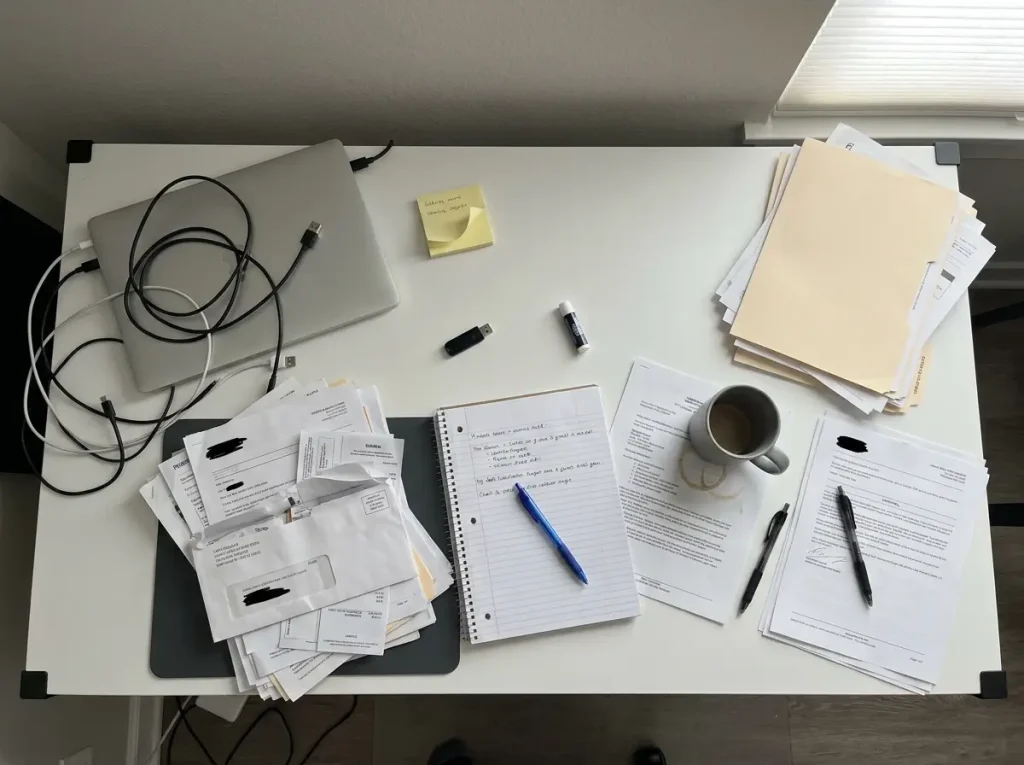
Most desks start organized and degrade because the surface has no rules about what goes where. Without designated zones, every square inch becomes an inbox. Mail lands wherever there’s space. Pens migrate. Your phone sits on top of a document you need to sign.
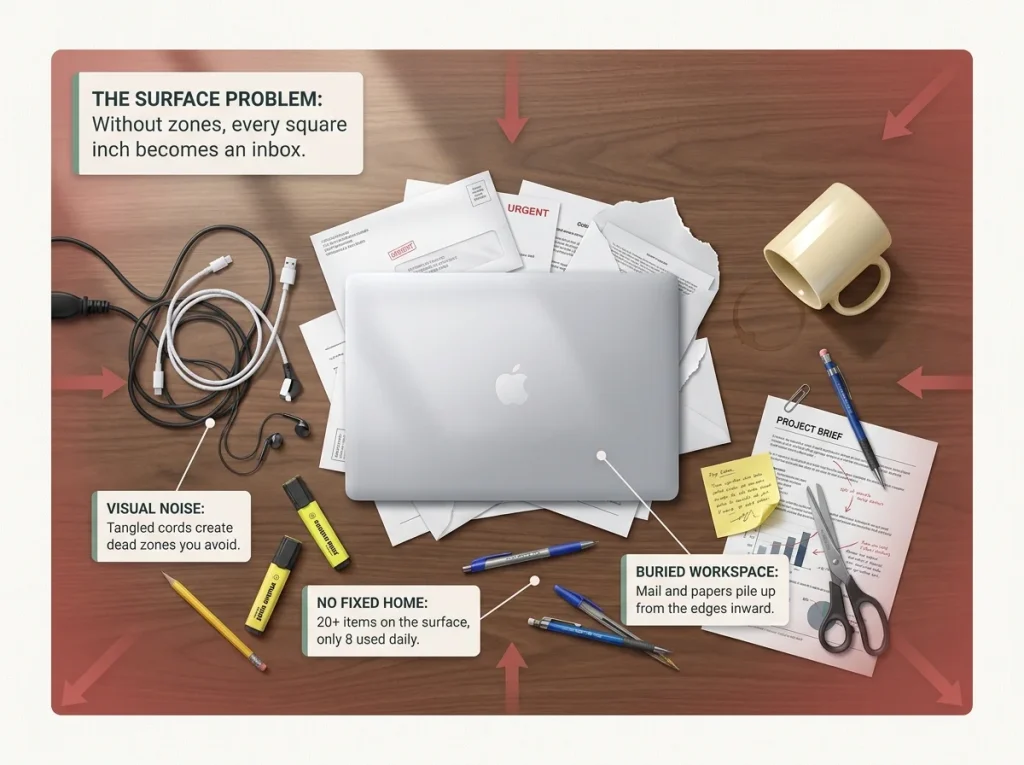
A standard home office desk is about 24 to 30 inches deep and 48 to 60 inches wide. That’s roughly 10 square feet of surface — and without zones, it fills up in three to five workdays. You don’t notice the accumulation because each item seems small. One piece of mail. One USB cable. One sticky note. By Friday, the “organized” desk from Monday is buried.
This isn’t a discipline problem. Your desk has no physical structure telling you where things belong and when it’s full. A flat surface with no boundaries will always accumulate until it’s covered.
Paper and Cables Are the Symptom
Paper piles and tangled cables are the two things people notice first on a messy desk. But they’re symptoms of missing systems, not the root cause. Paper accumulates because there’s no triage point — every piece that arrives sits on the surface until you deal with it or bury it under the next piece. Cables create visual noise because they’re draped across the front edge instead of routed out of sight.
The National Association of Productivity and Organizing Professionals found that 55% of consumers say disorganization costs them 16 minutes to an hour every day. On a desk, that lost time is mostly spent looking for things that don’t have a fixed location. The fix isn’t “tidy more often” — it’s giving every category of item a home and a rule for when it’s full.
Pro tip: Before you buy a single organizer, count what’s actually on your desk right now. Most people have 20 to 30 items on the surface when they only use 8 to 10 daily. The rest belongs somewhere else.
Start With the Desk Edit

The 5-Minute Clear-Off
Take everything off the desk. Not “sort as you go” — everything off, onto the floor or a nearby table. This matters because sorting while clearing triggers decision fatigue before you’ve even started organizing. You pick up a pen, wonder which drawer it belongs in, put it back “for now,” and twenty minutes later you’ve reorganized nothing.
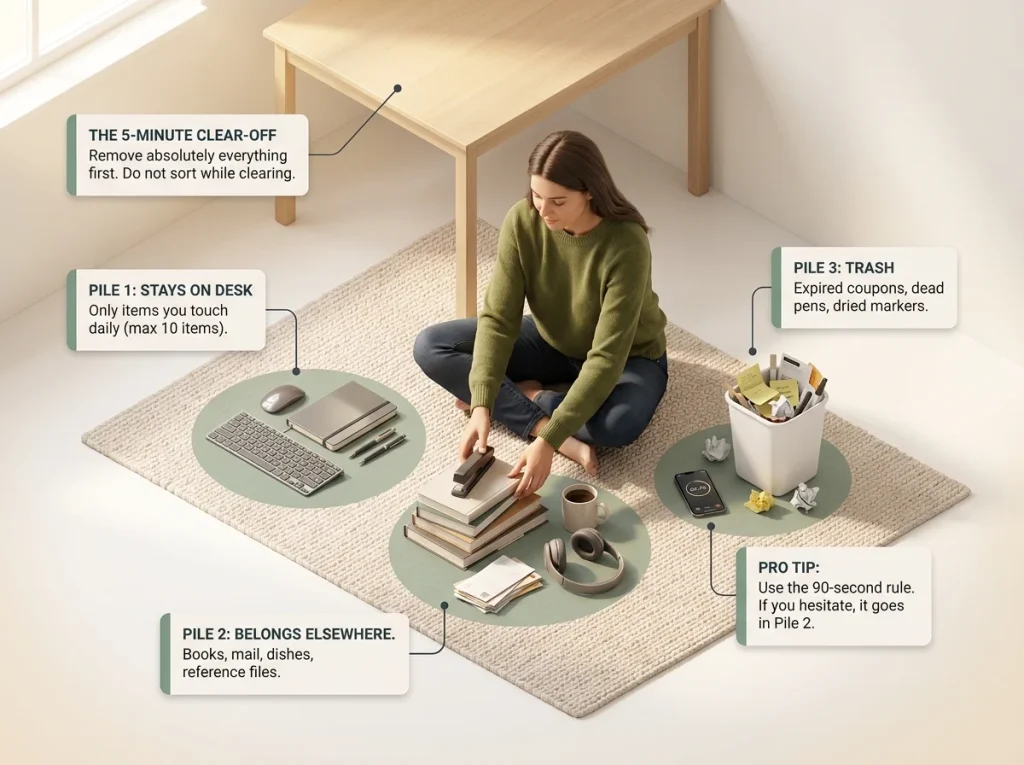
Set a timer for five minutes. Sweep the entire surface clean. Unplug peripherals you don’t use daily. Pull out the drawers and dump those too. The goal is a completely bare desk. If you’ve never seen your desk fully empty, this part feels uncomfortable — that’s normal. The discomfort passes once you start sorting.
The Three-Pile Sort
Once everything is off, sort into three piles: stays on the desk, belongs elsewhere, and trash. The “stays” pile should be small — only items you touch at least once a day. The “elsewhere” pile goes to its actual home (bookshelf, filing cabinet, kitchen, wherever). The “trash” pile will surprise you.
Use a 90-second rule: if you can’t decide which pile something belongs in within 90 seconds, it goes in the “elsewhere” pile. You can always bring it back. Most things you hesitate about don’t come back.
If your desk situation is part of a broader desk organization project, the edit is still the right first step. You can’t build zones on a cluttered surface.
Pro tip: Take a photo of your desk before you start the clear-off. When the system is working three months later, that photo reminds you why you’re doing the daily reset.
Zone Your Desktop Surface
The 18-Inch Primary Zone
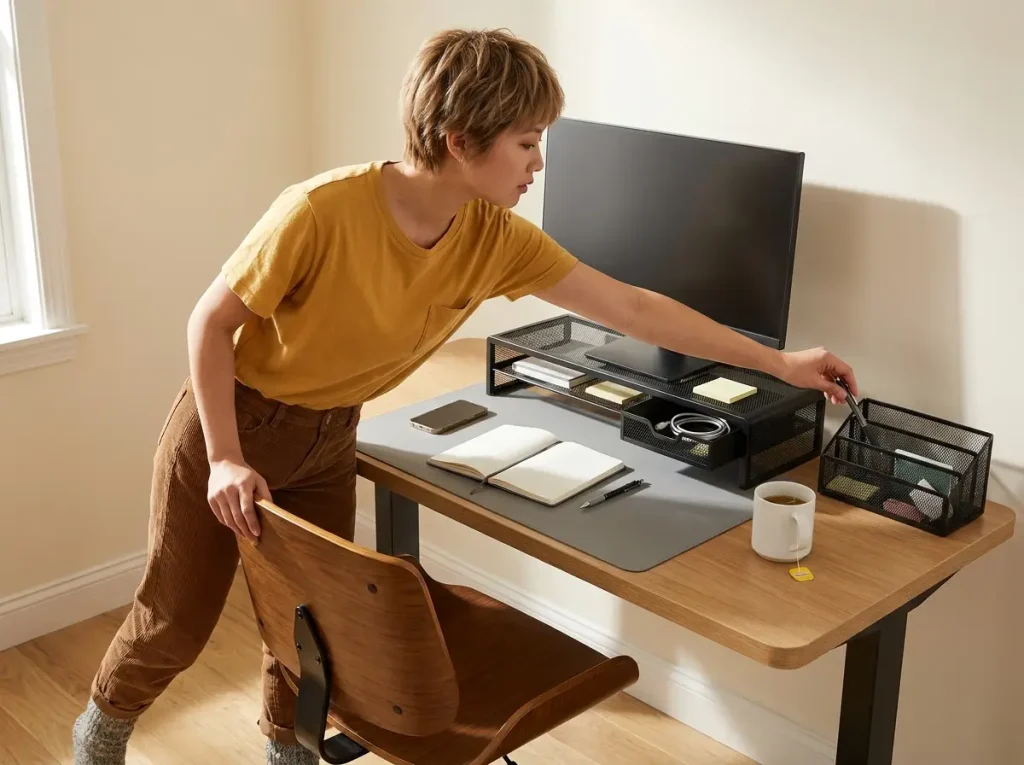
Your primary zone is the 18-inch radius from where your hands naturally rest. On a standard 24-inch-deep desk, that covers nearly the entire depth — which means most of your surface is prime real estate. Everything in this zone should be something you use daily: keyboard, mouse, current notebook, a pen.
The rule: maximum 10 items in the primary zone at any time. If you count more than 10, something doesn’t belong there. The zone boundary matters because clutter builds from the edges inward. Items pushed to the back of the desk eventually creep forward as new things land on the surface.
Vertical Storage
The fastest way to reclaim desk surface is to move things up. A monitor riser lifts your screen to eye level — better for your neck — and creates storage underneath. The WALI STT005-B Metal Mesh Monitor Riser measures 23.6 by 9 inches with a drawer and side pockets built in. It holds monitors up to 27 inches, but it adds 4.3 inches of height — check that your screen doesn’t end up too high for your chair setup before committing.
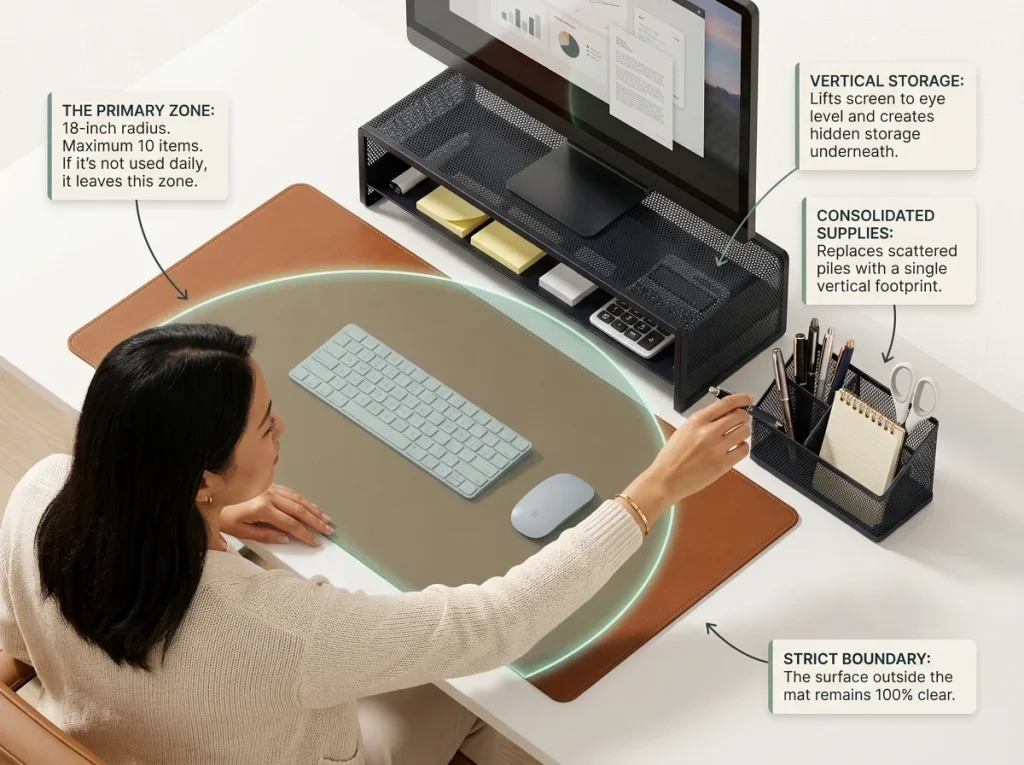
A single desk organizer replaces the scattered pens, scissors, tape, and supplies spread across your surface. The SimpleHouseware Mesh Desk Organizer has a sliding drawer, double tray, and five upright sections — it consolidates everything into one vertical footprint instead of six separate piles. The mesh collects dust faster than solid surfaces, so give it a wipe during your weekly reset.
To define the primary zone physically, a desk pad draws a visible boundary. The Aothia PU Leather Desk Pad at 31.5 by 15.7 inches covers the center working area on most standard desks. When the pad looks cluttered, you know the primary zone is overfull — it’s a built-in visual signal. If you’d rather not spend on this, a piece of colored shelf liner from the dollar store defines the zone just as well.
Pro tip: Place the desk pad down before setting up anything else. Treat it as the hard boundary — if an item doesn’t live on the pad, in the riser drawer, or in the organizer, it doesn’t live on the desk surface.
Organize Drawers and Paper
Frequency-First Drawer Organization
Most people organize desk drawers by category: pens in one section, tape in another, paper clips in a third. This makes sense in theory but fails in practice because you end up opening three compartments to grab the things you use together every morning. Organize by frequency instead: the top drawer or front of a single drawer holds daily items, the middle holds weekly items, and the back holds reference materials you rarely need.
The Marbrasse Bamboo Expandable Drawer Organizer has 10 adjustable compartments that let you set up frequency zones in any standard desk drawer. Bamboo holds up better than plastic under the weight of accumulated office supplies — cheap plastic dividers flex and lose their shape within a few months, and everything slides together into one pile. The tradeoff is that bamboo walls are slightly thicker, so you lose about half an inch of usable depth per divider.
Label every compartment. You’ll think you’ll remember what goes where. You will — for about two weeks. Then someone borrows a stapler, puts it back in the wrong section, and the drift begins. The Brother P-Touch PTD220 Label Maker is the standard pick, though chalkboard labels with a chalk marker work if you want something cheaper and easier to update.
The Three-Tray Paper System
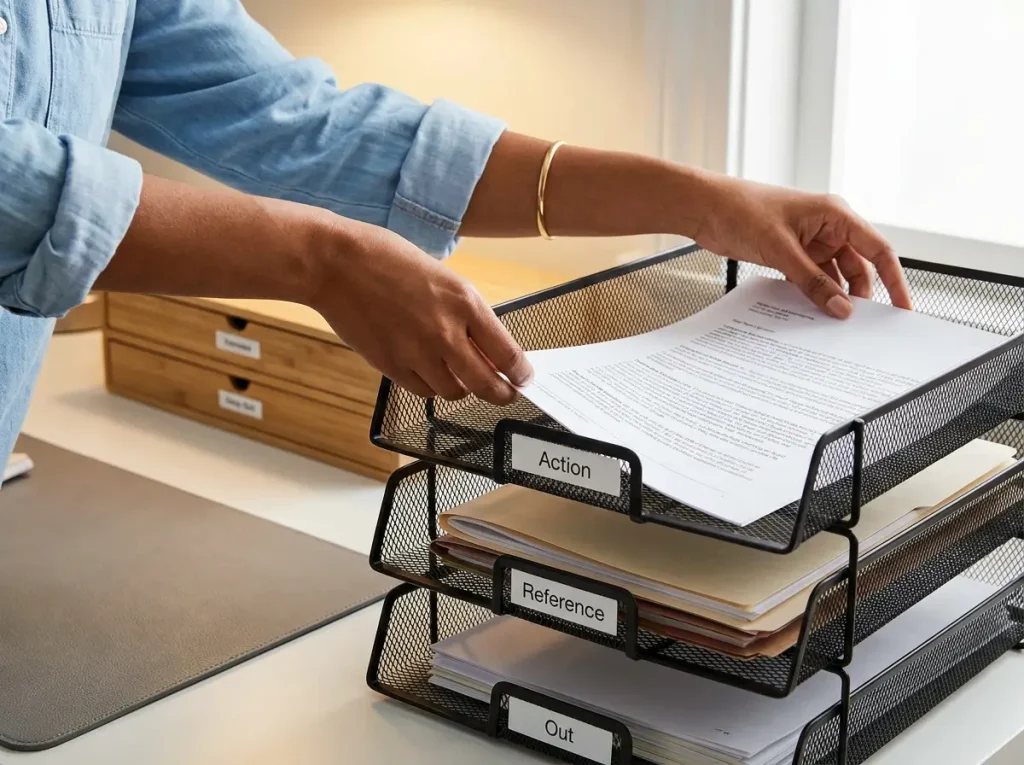
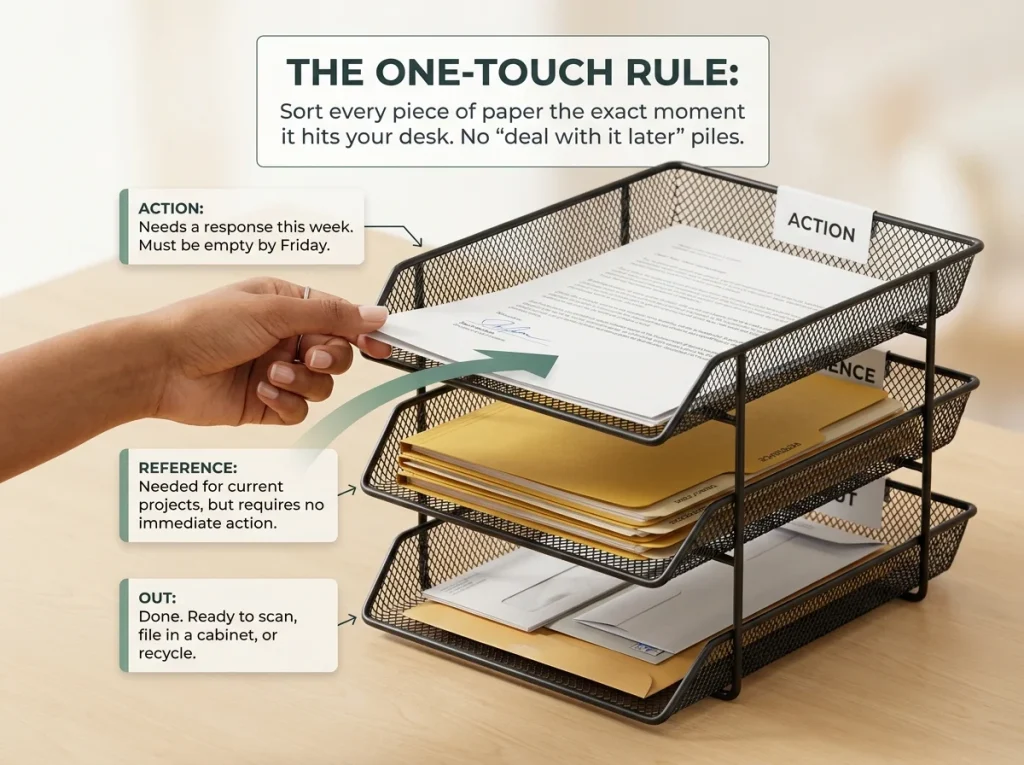
Paper is the top surface clutter source on any home office desk. The fix is a three-tray system: Action (needs a response this week), Reference (you might need it but not right now), and Out (done — ready to scan, file, or recycle).
The rule is one-touch: every piece of paper gets sorted into a tray the moment it arrives on your desk. No “I’ll deal with it later” pile on the surface. David Allen’s Getting Things Done method uses this same principle — the moment you touch a piece of paper, you decide what it is and where it goes. The Action tray should be mostly empty by Friday. If it’s not, you’re using it as a storage shelf instead of a decision point.
If three mesh letter trays don’t fit your budget, three manila folders labeled with a marker and stood upright in a bookend do the same job for almost nothing.
Fix the Cable Problem
Why Cables Are the Biggest Visual Problem
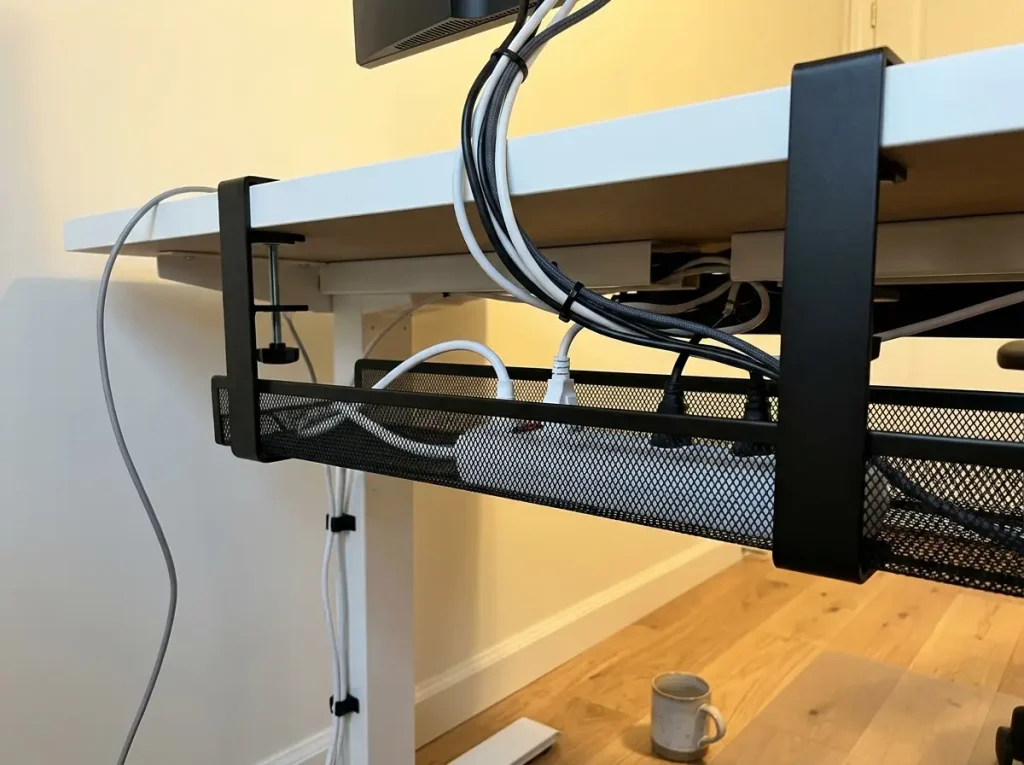
You can organize every item on your desk into the right zone and the right drawer, and the desk will still look messy if five cables are draped across the front edge. Cables create visual noise out of proportion to their size. They tangle, collect dust, and make you avoid the area around the power strip — which means that section of desk becomes a dead zone where things pile up because you don’t want to untangle anything to reach it.
The first time I routed all cables off the desk surface, the desk looked twice as clean with zero other changes. That’s how much visual weight cables carry.
No-Drill Cable Management
If you rent, drilling a cable tray into the underside of your desk isn’t an option. The Cinati 16″ Cable Management Tray (2-Pack) clamp-mounts to the desk edge — zero screws, zero holes. It fits desk thicknesses from 0.4 to 3 inches, which covers most home office desks and tables. Mount the power strip inside the tray, route all cables through it, and the desktop goes from five visible cables to zero.
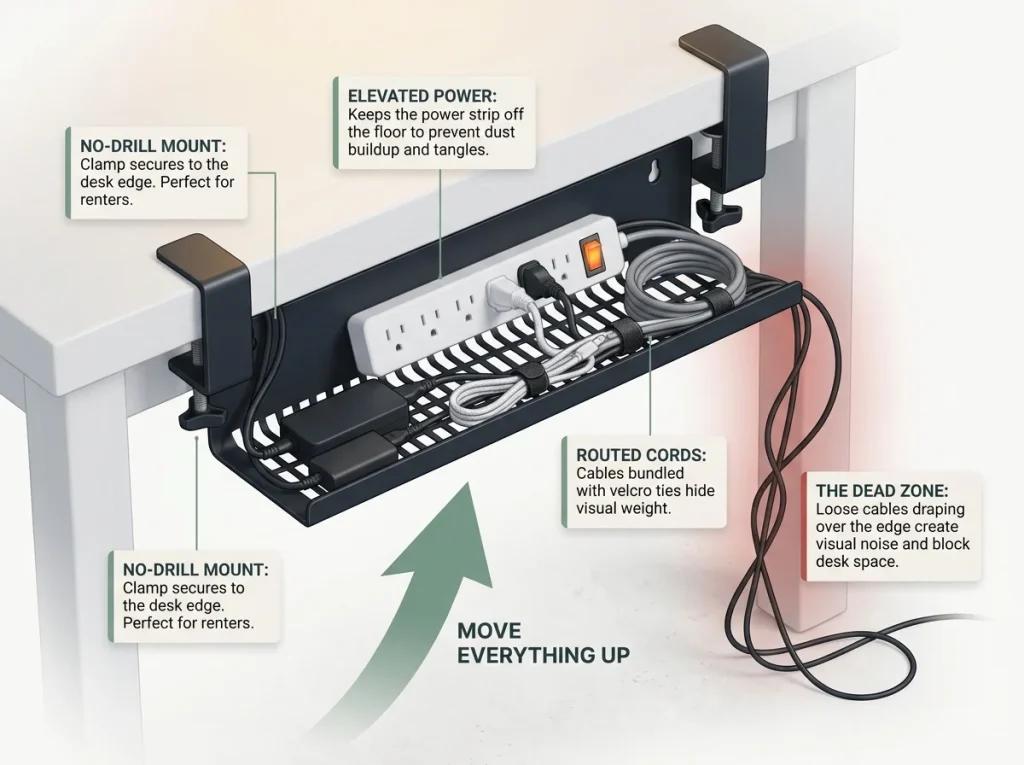
The clamps leave small pressure marks on soft wood. On laminate or painted surfaces, the marks wipe off. On raw pine or unfinished wood, put a small felt pad between each clamp and the desk to prevent denting.
If you want something cheaper, a pack of reusable Velcro cable ties bundled around the cables near the power strip reduces tangle for a fraction of the cost — it won’t hide cables completely, but it stops the spaghetti look. Command adhesive clips along the back edge of the desk can route individual cables out of sight.
The 5-Minute Daily Reset

Why 5 Minutes Daily Works
Weekly desk cleanups don’t work. They get skipped because life happens, and when you do sit down to clean the desk on a Sunday, the mess is overwhelming enough that you reorganize instead of resetting. Then the “new system” lasts until Wednesday again — the same cycle.
A five-minute daily reset at the end of each workday keeps the desk in its organized state permanently. The sequence: clear the surface (everything back to its zone), process the Action tray (decide or defer each item), check the top drawer for misplaced items, push any loose cables back into the tray, and wipe the desk pad with a dry cloth.
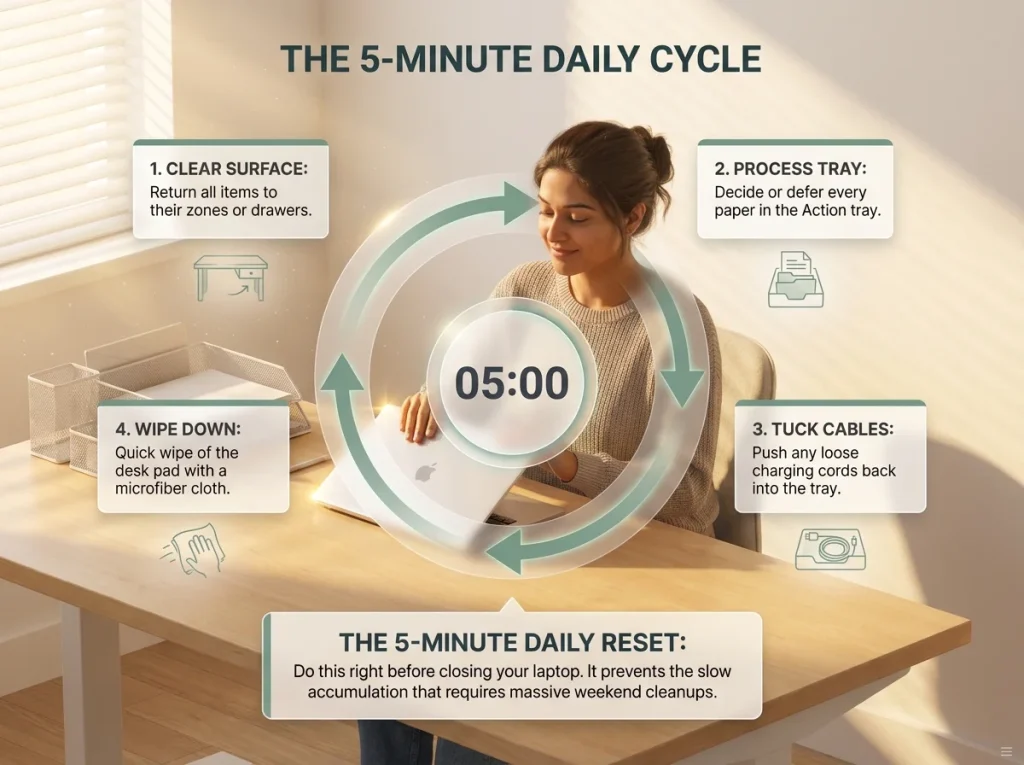
Five minutes is short enough that you’ll actually do it. Thirty minutes once a week sounds reasonable but feels like a chore when the moment arrives. A daily reset becomes invisible — it’s the last thing before you close the laptop, as automatic as turning off the desk lamp.
If you’re looking for more approaches tailored to different desk sizes and work styles, these desk organization ideas cover additional methods that pair well with the zone system.
The Floor Rule and Monthly Audit
One rule prevents desk mess from spreading: nothing goes on the floor around the desk. No bags, no boxes, no “I’ll put this away later” piles. The floor is the overflow zone that enables surface clutter — if you can dump things beside the desk, you will, and they migrate back up within a week.
Once a month, open every drawer and check whether items are still in their frequency zones. Things drift — the label maker ends up in the daily section after you used it once last Tuesday, the stapler migrates to the back of the reference drawer. A five-minute monthly audit catches this drift before it turns into a full reorganization.
Every three months, reassess the primary zone. Your work changes, your tools change, and the 10 items you used daily in January might not be the same 10 in April. The zone should evolve with your workflow, not freeze in the state you originally set it up.
Pro tip: Set a recurring calendar reminder for the first of each month — “desk drawer audit, 5 min.” Without the reminder, the monthly check quietly becomes the quarterly check, then the never check.
Conclusion
Three things keep a desk organized past the first week: editing what’s on the surface before adding any system, creating physical zones that define where each item belongs, and running a five-minute daily reset that prevents accumulation before it starts.
Three-Month Check: Open every drawer and verify that the frequency zones still match how you actually work. Move anything that’s drifted to its correct section.
Start with the desk edit. Set a five-minute timer, take everything off the surface, and sort into three piles. That’s the foundation — everything else builds on a bare desk.
Q1 How do I declutter a desk that’s completely covered in stuff?
Remove everything from the desk surface first without sorting — sorting while clearing causes decision fatigue that stalls the whole process. Once the desk is bare, sort into three piles: stays on desk, belongs elsewhere, and trash. Most people find that over half their items belong in another room entirely.
Q2 What should I keep on my desk?
Keep only the items you use daily within arm’s reach — typically 8 to 10 things like your keyboard, mouse, notebook, and a pen. Everything else belongs in a drawer, on a shelf, or in another room. The fewer items on the surface, the longer the desk stays organized.
Q3 How do I organize a small desk with too much stuff?
Use vertical storage — a monitor riser with built-in drawers and a single desk organizer move items up and off the surface. Then apply the three-pile sort to remove anything you don’t touch daily. Most small-desk clutter comes from keeping weekly-use items on the surface instead of in drawers.
Q4 How do I keep my desk organized every day?
Run a five-minute reset at the end of each workday: clear the surface, process the paper Action tray, check the top drawer, and wipe the desk pad. Daily resets prevent the slow accumulation that makes weekly cleanups feel overwhelming and easy to skip.
Q5 Does a clean desk actually improve productivity?
A clear, organized desk reduces the time you spend searching for items and lowers visual distraction during focused work. The National Association of Productivity and Organizing Professionals reports that disorganization costs most people 16 minutes to an hour per day — time mostly spent looking for things without fixed locations.