

You spent a Sunday afternoon on it. The pencils got sorted by lead number, the trays lined up square to the edge, the cables tucked somewhere behind the monitor, and you took the photo.
Then Wednesday happened, and by the following weekend the cords have re-tangled themselves, a stack of mail is sitting on top of the tray system, and every small object you own has migrated back into one pile near your right hand. That is not a discipline failure, and most aesthetic desk organization ideas skip the part that actually explains it: styled storage is open storage, and open storage has no guardrails. This article gives you the mechanism instead of the mood board, in the order that makes it hold: palette first, then an item ceiling, then cables, then the three systems that keep the surface honest.
Quick Answer
An aesthetic desk survives past week two when five decisions are made once, in this order:
- Edit the surface down before styling anything. You cannot make a crowded desk look calm.
- Commit to ONE material family (wood tones, clear, or matte black) and buy nothing outside it.
- Cap the visible surface at ten items and a styled riser shelf at five to nine.
- Conceal cables before you decorate. Visible cords undo every other choice.
- Give every remaining object a closed home so it has somewhere to return to.
Why Aesthetic Desk Setups Fall Apart in Week Two
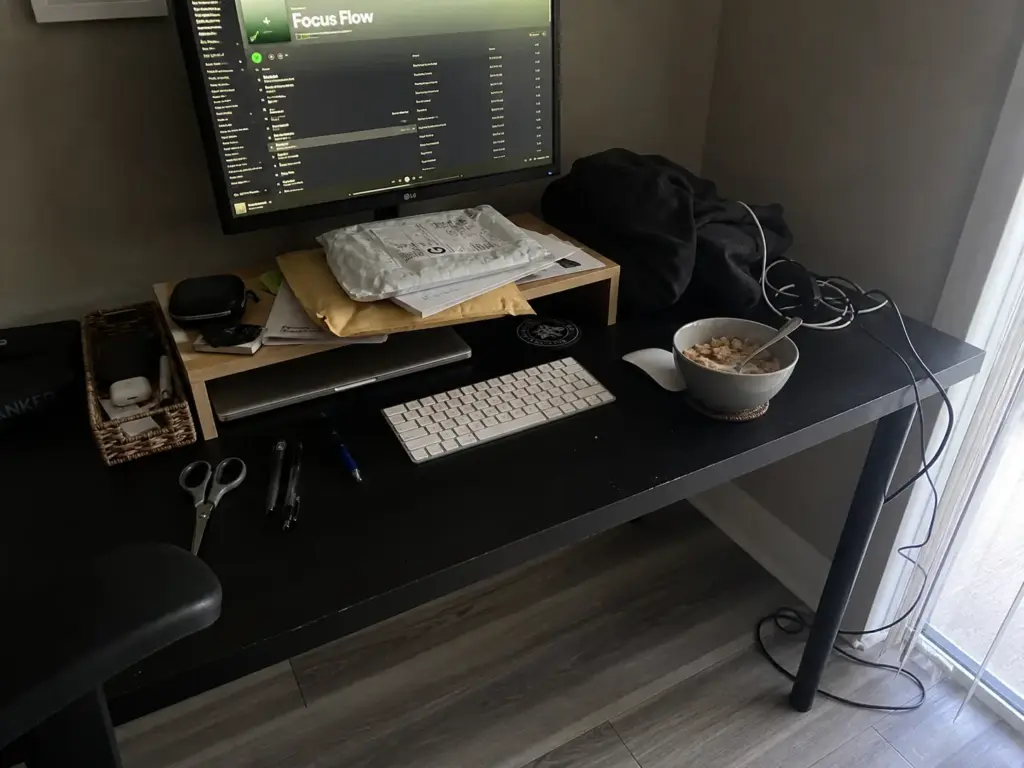
Everyone assumes the styled desk collapsed because they got lazy. They didn’t. They built a system with no walls and then blamed themselves when things walked in through the opening. And no, the answer isn’t to declutter desk surfaces harder next time — you already did that part, which is exactly why it looked good on day one.
The week-one collapse pattern
The reversion follows the same sequence almost every time, and it shows up in desk-setup threads with enough repetition to be a genre. Day one is the desk edit: everything sorted, the pens grouped, the trays aligned.
Day three, a cable gets unplugged for a laptop that came home from the office, and it doesn’t go back into its clip. Day five, mail arrives and lands on the flat surface of the tray, because that is what flat surfaces are for. By day eight the small objects are re-pooling, because a pen you use twelve times a day was never going to travel back into a drawer twelve times a day.
Notice what the styled desk survived and what it didn’t. It survived being looked at. It did not survive a new task touching it. That’s the whole failure in one sentence, and it’s the part no listicle mentions because a listicle is written from the photograph, not from the following Tuesday.
Open storage has no guardrails
Here is the mechanism. A closed drawer imposes a decision. To put something in it, you have to pull it open, look at what’s already there, and place the object somewhere specific.
That friction is annoying, and the friction is exactly the feature. An open rattan tray asks nothing. You set a thing down and the thing is now stored, officially, forever, at no cost to you.
Every good-looking storage solution shares this property. Baskets, woven storage, exposed shelves, catch-alls, the little brass dish you bought for keys: they all accept input silently. The prettier the storage, the more permission it grants, because open access is exactly what makes it photograph well.
So the desks that look best on day one are structurally the ones most likely to be a pile on day twenty. This is what we call desk drift, and on a styled desk it runs faster than anywhere else in the house. That’s the real aesthetic vs functional tension, and it isn’t the one people assume: the styled desk doesn’t fail because it sacrificed function for looks, it fails because looking good required leaving everything open.
Why this is structural, not a discipline problem
Reframing this matters more than it sounds, because the guilt version of the story leads to the wrong fix. If you believe the desk collapsed because you lack willpower, your next move is to try harder, which produces the same result four weeks later with more resentment attached.
If you believe it collapsed because open storage accepts unlimited input, your next move is to build in a ceiling and a return path. One of those is a personality overhaul. The other is two decisions you make once and then stop thinking about.
I used to lead with product recommendations for this kind of query, on the theory that people searching for a styled desk want to know what to buy. The pattern in organizing threads changed my mind: the people who buy first and decide later end up with three beautiful objects that don’t agree with each other, and then they buy a fourth to fix it. Deciding the palette and the ceiling before spending anything is free, and it’s the part that survives. It’s the same three-month reversion that undoes minimalist systems, applied to a surface where every storage container is deliberately open to the room.
Pick One Material Palette and Refuse Everything Else
There’s a specific kind of desk that reads as cluttered even though everything on it is technically put away. Nothing is loose. Every pen has a holder, every paper has a tray.
And it still looks like noise. That’s a palette problem, and no amount of tidying will fix it, because tidying is not what’s broken. You can declutter first and land right back here if the things that remain don’t agree with each other.
What visual noise actually looks like on a desk
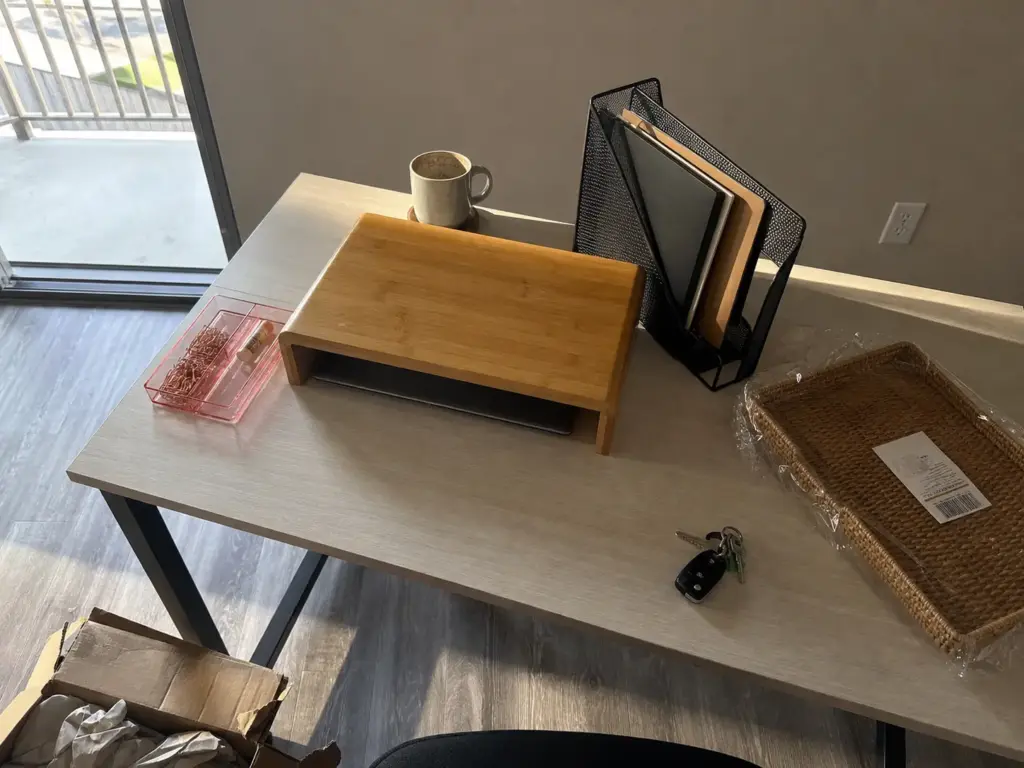
Picture the setup that gets posted with the caption “why does this still look messy”: a bamboo riser holding the monitor, a black metal file rack to its left, a pink acrylic tray in front of the keyboard. Three storage objects, all doing their jobs, all containing their contents. Your eye reads warm wood, then cold matte metal, then translucent color, and it stops at each transition to process a new surface.
That’s the mechanism. Every distinct material and finish carries its own visual weight, competing for your attention whether or not it holds anything.
Three material families on one small surface read as roughly three times more stuff than is actually there, because the count your brain does isn’t of objects, it’s of visual events. Which is why the fix isn’t removing things. It’s removing differences.
Photograph your desk with your phone before you buy anything. A photo flattens the scene into two dimensions the same way your eye does at a glance, and the material clashes you’ve stopped noticing in person jump out immediately on a small screen. It’s the cheapest diagnostic in this article and it takes four seconds.
The three palettes that work
Pick one family and let everything on the visible surface belong to it. There are three that hold up on a desk, and this is not a color scheme, it’s a material family.
- Wood tones. Bamboo, rattan, oak, walnut. Warm, forgiving, and the easiest to assemble from mixed brands. This is the family a japandi desk or a scandinavian desk organization setup is already built on, if you want a name for what you’re aiming at.
- Clear. Acrylic and glass. Reads as almost nothing visually, which is its entire appeal, though it shows dust and fingerprints with total honesty.
- Matte black and metal. Sharp and modern, and the least forgiving of the three, because black finishes vary more than people expect and a satin black next to a true matte black looks like a mistake.
Whichever you pick, the style cohesion is doing the work, not the specific family. A fully committed matte-black desk beats a half-committed wood one.
Wood tones win for most people, and the reason is specific rather than aesthetic. Bamboo and rattan from two different manufacturers read as the same family even when the actual tones differ, because your eye already accepts natural material variation as natural.
Acrylic and metal don’t get that grace. A warm-cast acrylic next to a cool-cast acrylic clashes visibly, and two black finishes from different factories almost never match. If you’re buying wood-tone desk accessories over time rather than in one order, that’s the family that tolerates the drift. If you’re starting from scratch and want the category-by-category breakdown, the palette decision should still come first, then shop inside it.
Why the look is the discipline, not the price tier
The most useful thing I can tell you about achieving a styled desk is that the styling is the restraint, not the receipt. A committed bamboo-and-rattan desk where every object belongs to one family reads as more intentional than an expensive walnut-and-brass setup with three stray materials scattered across it.
Roundups in this category will happily list a set of cable clips and a filing cabinet on the same page as interchangeable “ideas,” which quietly turns the whole question into splurge vs budget and implies the look scales with spending. It doesn’t. A budget-friendly desk organizer that belongs to your family beats a boutique piece that doesn’t, every time. It scales with saying no to the fourth material.
And nothing about a palette decision needs a drill, a landlord’s approval, or a security deposit. It’s the cheapest lever in this entire article, and you can pull it tonight without buying anything, by moving the two objects that don’t match into a drawer and seeing what the desk looks like without them.
The lighting exception
One object gets to break the palette rule, and it’s the desk lamp. A lamp is the only thing on the desk that changes what every other object looks like, so it gets judged on the color of its light before the color of its base. Warm bulbs flatter wood tones and make rattan look like rattan instead of like straw; cool white light drains warmth out of bamboo and pushes a wood-tone desk toward looking grey and cheap. If your palette is wood and your lamp throws cool light, the palette loses the argument every evening at sunset.
Natural light is the free version of the same lever, and it comes with a placement rule most people get backward. Put the desk perpendicular to the window rather than facing it or backing onto it. Facing the window means squinting at a bright rectangle behind your screen all afternoon; backing onto it means your own shadow lands on the desk and the monitor picks up the reflection. Perpendicular gives you side light across the surface, which is also the angle that makes a styled desk photograph well, if that matters to you.
Hide the Cables Before You Style Anything
Most people decorate first and deal with cables never. Then they photograph the desk from the one angle where the cords don’t show, which is a fine solution for the photo and no solution at all for the room. Cables are the highest-impact fix on a styled desk and the one everybody defers, because it’s the least enjoyable hour of the project and there’s nothing pretty to put on the shelf at the end of it.
The sequencing rule is simple: cables come before decor, always. A desk with visible cords looks unfinished no matter what you set on top of it, and every other choice you make is downstream of this one.
Worth saying up front that this section is about concealment and material match, not routing mechanics. If you want service loops, under-desk trays, and the full order of operations for a multi-device setup, the full routing breakdown lives here. We’re staying in the styling lens.
Start with what you already own
Before buying anything, bundle and shorten what’s already there. Most desks carry about three feet of excess cable per device, doing nothing but making loops behind the monitor, and a twist tie or a spare velcro strap does the job of a cord organizer for free. Do this first. You’ll discover that maybe two runs actually need concealing, not eight, and that changes what you buy — often from a full cable management sleeve down to three clips.
Renter hardware and the weight limits nobody prints
This is where styled-desk advice quietly assumes you own the place. Adhesive mounting is what makes no-drill desk organization possible at all, and it works, but only inside limits that most articles never mention. Command’s own weight-limit guidance caps standard strips at 16 pounds, with heavy-duty versions rated above 20, while cord bundlers hold roughly 2 pounds each. That last number is the one that matters, because a cord bundler is sized for the weight of cable and nothing else.
So the failure to avoid is specific: hanging a power strip off a single cord bundler. A loaded power strip with four bricks plugged into it clears 2 pounds without trying, and adhesive under sustained load doesn’t fail gradually, it fails at once, usually in the middle of the night. If you want the strip off the floor, mount it on heavy-duty strips rated for the actual weight, or set it on a shelf and stop asking adhesive to do structural work.
That constraint is what separates a renter-friendly desk from a magazine one, and it rules out most of what gets recommended for this look. A tension rod run between the desk legs is the workaround that keeps coming up in small-space threads: it holds a power strip and a bundle of slack cable under the desk with no adhesive and no holes, and it comes down with the lease.
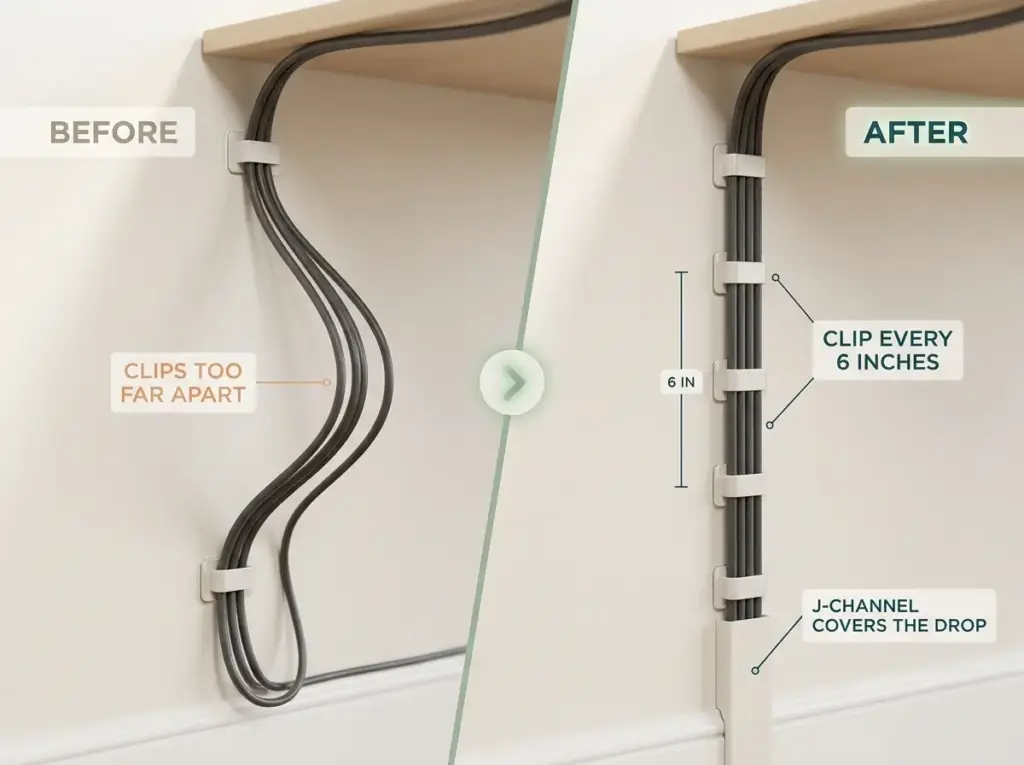
Spacing is the other detail people execute wrong. Cord clips need placement roughly every 6 inches along a run, not one at each end. Two clips holding a four-foot run means the middle droops into a visible smile, and under a glass or acrylic desk that sag becomes the single most noticeable thing in the room, which is a particularly cruel outcome for a desk you chose for its clean lines.
Raceway is the one piece that doesn’t have to match
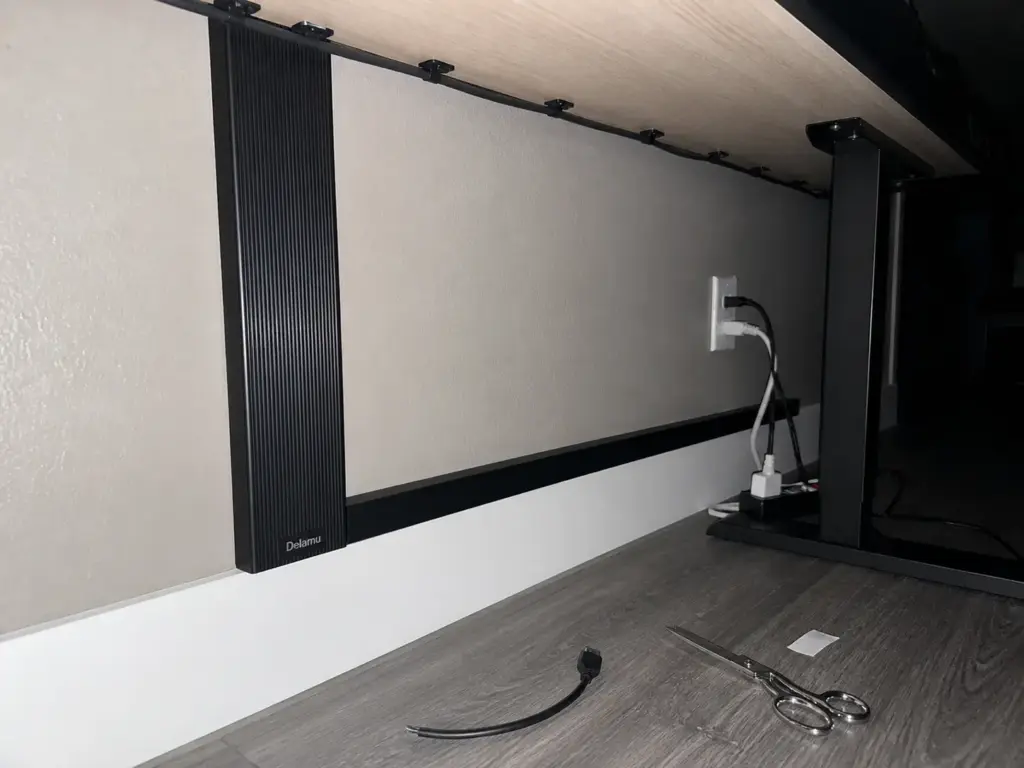
For the vertical drop from desk to baseboard, a J-channel raceway is the cleanest concealment available to a renter, and it carries an advantage worth naming out loud: it’s material-neutral. Trays, baskets, and holders all have to join your palette. A raceway typically gets painted or matched to the wall instead, which means it disappears rather than joining the composition. That’s a real structural advantage over every other storage object on your desk.
The Delamu J-Channel Cable Raceway comes as a 4-pack totaling 62.8 inches, and the pack size is the part that matters. A standard six-foot desk needs the vertical drop to the baseboard plus a horizontal run along the wall, and a single channel covers one of those, which is how people end up placing a second order for the same product a week later. Two caveats: adhesive-backed raceway wants a clean, smooth wall to bond to, so heavily textured paint is a poor candidate, and removing it later can take finish off with it. Renters with strict walls should test one short section behind a monitor before committing to a full run.
Get Storage Off the Surface and Onto a Riser

The bamboo monitor riser is the one purchase that changes the proportions of the entire desk. It does two jobs at once: it lifts the screen to a height that stops wrecking your neck, and it turns the footprint underneath into vertical storage instead of dead air. On a styled desk, surface area is the scarce resource, and a riser is the only object that gives more of it back than it takes.
It’s also the largest single piece of material you will add, which makes it the anchor of your palette. Choose the riser first and buy everything else to match it. Do it the other way around and you’ll spend the rest of the project matching a mistake, because the biggest object always wins the argument about what the desk is made of.
The shelf top becomes the new clutter
Here’s what nobody tells you about adding a riser: the shelf on top is a surface, and surfaces accumulate. You just built a second desk twelve inches above the first one, and it will fill exactly the way the first one did unless you give it a number. If you’ve seen the 5-item rule applied to small desks elsewhere on this site, this is the same logic scaled to a shelf.
A riser shelf holds a workable five to nine items depending on its size, which is tighter than the ten-item primary zone rule we use across the whole desk cluster. Ten works for a whole desk zone because a standard 24-inch-deep desk is mostly reachable from where your hands rest. A riser shelf is a fraction of that area and sits at eye level, so it reads as a display shelf whether you intended one or not, and display shelves get judged harder.
Spacing matters more than the count, which is the part people miss. Six objects pushed together into one cluster still read as cluttered, while six objects with visible gaps between them read as arranged — the negative space between things is doing as much work as the things. If you have to choose between removing an item and spreading out the ones you keep, spread them out first and then see if you still want to cut one.
Measure the monitor base before you buy
Every riser looks identical in listing photos. A 24-inch one and an 18-inch one are photographed at the same scale, from the same angle, holding the same generic screen, and there is no visual cue telling you which is which. So measure the footprint of your monitor’s base, not the width of the screen, because a widely-splayed V-stand or a broad circular base can be far wider than the panel above it. Finding out after assembly is a common and entirely avoidable Saturday.
Before you buy anything at all: a sturdy stack of hardcover books does the height job for nothing. It won’t do the storage job, it won’t do the palette job, and it looks like a stack of books. But if budget is the constraint right now, height is the part that matters most for your neck, and you can solve that part today and the rest later.

Give Paper and Small Items a Closed Home
Paper is what ends a styled desk. Not clutter in the abstract, and not your habits: mail, specifically, arriving on a schedule you don’t control.
Why paper is the reversion vector
Paper is the only category that shows up every single day without being invited. You didn’t decide to acquire it, you can’t decline it, and it arrives in a form that is flat and stackable, which means it will find the flattest available surface within about four seconds of entering the room.
Any styled desk that lacks a designated landing spot for incoming paper will be defeated by paper inside a week. Not by clutter in general. By envelopes.
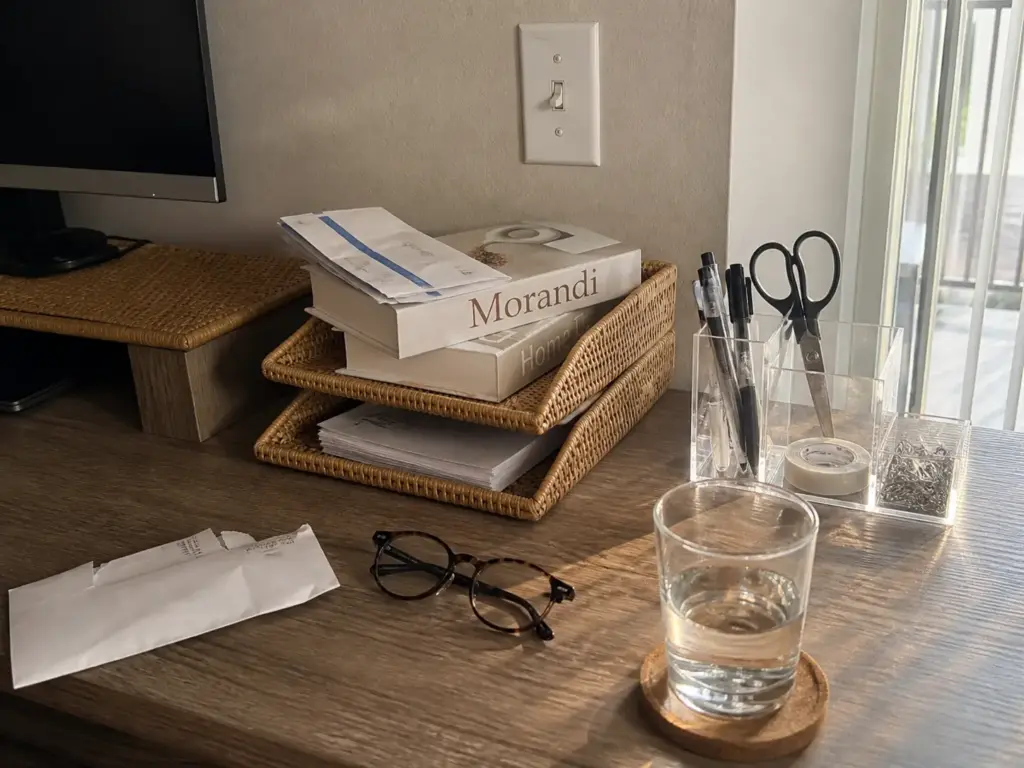
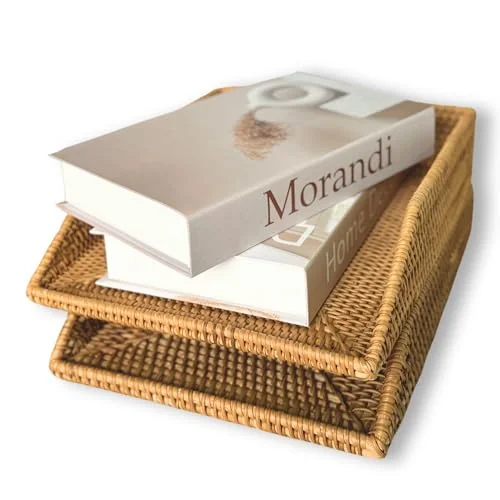
The fix is an inbox and an outbox: a two-tier paper tray organizer, stacked or side by side, one tray for “needs action” and one for “done or file.” The point isn’t the trays themselves, it’s that paper gets sorted on arrival instead of stacked for later, because “later” is where paper piles come from. The professional default is a three-way triage into action, file, and shred the day it lands, and professional organizers recommend keeping only work essentials within arm’s reach, which is the same principle pointed at paper rather than pens. Two trays gives you the action/file split at the desk and sends shred straight to the bin without ever touching the surface.
Palette consistency applies to trays too, and this is exactly where most people break it. Having committed to bamboo for the riser, they buy the black metal file rack because it was the one that came up first, and now the desk has the clash from the beginning of this article sitting right in the middle of it. A rattan desktop organizer next to bamboo stays in the wood-tone family. Black metal next to bamboo does not.
The consolidation math on small items
The other half of the reversion is loose small objects, and there’s a counting trick here that changes the whole calculation. Four little containers holding pens, clips, scissors, and sticky notes are four visible objects. That’s nearly half your ten-item budget spent on things whose only function is holding other things.
One multi-compartment holder replaces all four. Three visible objects leave the surface and you haven’t removed a single tool, which makes it the cheapest room you’ll ever buy inside your item cap.
The NIUBEE Acrylic Pen Holder does this in four compartments with a compact footprint, and the acrylic is the interesting part: clear takes on whatever sits behind it, so it stays visually neutral against wood tones instead of introducing a fifth material. That’s the documented exception to the one-family rule, and it’s genuinely useful. The catch is that clear acrylic shows every fingerprint and every drift of dust with complete honesty, which is fine on a desk you wipe weekly and irritating on one you don’t.
Then the rule that ties this section to the rest of the article: every object left on the surface needs a home it returns to, not just a place it currently sits. A pen resting next to the keyboard has a location. A pen that lives in compartment two has a home. The difference sounds semantic until week three, when only one of those two desks still looks like the photo.
Empty the outbox tray on a fixed day, not when it looks full. An outbox that never gets processed stops being an outbox and becomes a decorative pile with better lighting, which is the most common way a two-tray system quietly dies. Friday afternoon works because you’re already half checked out.
Extend the Palette Into the Drawer, Then Set the Maintenance Rule
The drawer is where the discipline actually gets tested, because nobody photographs a drawer. It’s also the pressure valve for everything above it, and that’s the part worth understanding.
A ten-item surface needs a functional place for item eleven
Your surface cap only works if putting something away is easier than leaving it out. If opening the drawer means facing a jumble of cables, dead batteries, and a stapler nobody has used since 2021, then the object stays on the desk. Every time. Not because you’re undisciplined, but because you made a rational comparison between two options and the drawer lost.
So the drawer isn’t a separate project you’ll get to eventually. It’s the thing that makes the surface rule enforceable, and it should be done in the same session.
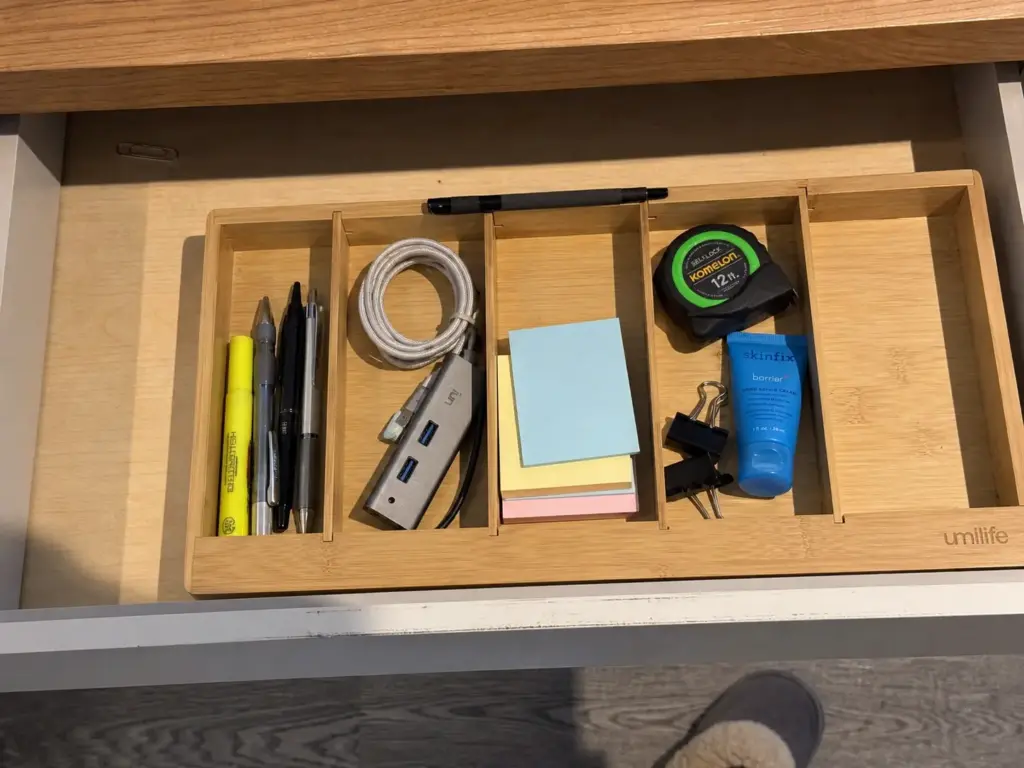
Carrying the palette inside is a smaller point, and I’ll state it once rather than belabor it: a wood-tone insert in a bamboo-anchored setup makes the drawer read as part of the same system rather than as the place where the system stops. Continuity gets maintained. Discontinuity gives you permission to quit at the edge of the visible.
Measure the interior width first
Roughly 12 inches is a common shallow desk drawer width, and plenty of inserts are built for exactly that. But wider executive desks frequently run 15 inches or more, and a 12-inch insert sitting in a 15-inch drawer floats loose and slides forward every single time you pull it open, so your neatly divided compartments arrive at the front of the drawer with their contents redistributed. Measure the interior, not the drawer front.
The Umilife Bamboo Desk Drawer Organizer runs 12 by 9 inches with six adjustable drawer dividers, and the adjustability is the reason it belongs here rather than a fixed-compartment tray.
Desk drawer contents change more than kitchen drawer contents do. A kitchen drawer holds the same forks for a decade; a desk drawer holds whatever your current job requires, and that shifts with every role change, project, and device upgrade. Fixed compartments are a bet that your life will stay the same shape. The limitation is the one above: check that 12-inch measurement against your actual drawer, and if yours runs wider, plan on two inserts side by side rather than one that slides.
The weekly reset and the month-three check
Once a week, anything on the surface that isn’t in your ten goes back to its home. That’s the whole desk surface rule, and it’s a reset rather than a reorganization, so it should take about two minutes. If it’s taking twenty, the problem isn’t the reset, it’s that the homes you assigned aren’t working.
The one-in-one-out rule is what keeps the ten from quietly becoming twelve: a new object earns its place on the surface by displacing one that’s already there, not by squeezing in beside it.
Which brings us to the single most useful sentence in this article, and the one worth keeping after you forget everything else. If the same three objects keep migrating back onto the surface every single week, they are not clutter. They are daily-use items you filed wrong.
Move their home closer instead of fighting them for the rest of the year. The lip balm that returns to the desk every Tuesday belongs in the riser drawer, not in a bathroom cabinet down the hall, and the reason it keeps coming back is that it was always going to.
That reframe is the whole three-month test in practice: a system that keeps needing correction in the same spot is giving you data, not a verdict on your character. When you’ve got the styling layer working and want the broader set of desk systems that hold up, the functional layer underneath is the natural next step.
Leave one empty compartment in the drawer insert on purpose. It absorbs the odd object that arrives without a category (a keycard, a cable adapter, a spare charger) instead of that object taking up residence on the surface while you decide. Just don’t let it become a general miscellaneous section, or it will eat the neighboring compartments within a month.
Conclusion
Three things carry the whole system. Commit to one material family before you buy anything, because the palette is the look and deciding costs nothing. Cap the surface at ten items and the riser shelf at five to nine, with visible gaps between them, since spacing beats counting every time. And conceal the cables before you decorate, because everything else you do is downstream of that one unglamorous hour.
In three months, look at which objects keep reappearing on the surface week after week. Those aren’t a discipline failure. They’re daily-use items living in the wrong home, and the fix is to move their storage closer rather than resetting them into the same wrong place a twelfth time.
Start with the palette. Pick your family, then clear everything on the desk that doesn’t belong to it into a box and leave it there for one week. You’ll know by Friday whether you actually needed any of it.
Frequently Asked Questions
01How do I keep an aesthetic desk from getting messy again?
Give every object a closed home and run a two-minute weekly reset where anything not in your ten items goes back to it. Styled desks revert faster than plain ones because open trays and shelves accept new items without resistance, so the reset replaces the guardrail a drawer would have given you.
02How many things should be on a desk to still look organized?
Cap the primary surface at about ten items and a styled riser shelf at five to nine. Spacing matters more than the count: leave visible gaps between objects, because six items pushed into one cluster still read as cluttered while six spread out read as arranged.
03How can I hide cables on my desk without drilling?
Use adhesive cord clips spaced about every 6 inches along each run, plus a J-channel raceway for the vertical drop to the baseboard. Watch the weight ratings: standard Command strips hold up to 16 pounds and cord bundlers only about 2 pounds each, so never hang a loaded power strip from a bundler.
04What material should I choose for desk organizers?
Pick one family and stay inside it: wood tones, clear acrylic, or matte black. The specific material matters far less than the commitment, since a desk with three competing materials reads as cluttered even when everything is put away. Wood tones are the most forgiving across different brands.
05Is an aesthetic desk setup worth it if I only have a small desk?
Yes, and the palette rule matters more on a small desk, not less. Visual noise is a function of how many competing objects share a surface, so a small desk hits the clutter threshold sooner. Get storage vertical with a riser and the small desk gains proportionally the most.
Disclaimer: ClutterlessNest is a participant in the Amazon Services LLC Associates Program. As an Amazon Associate we earn from qualifying purchases. This article may contain affiliate links — if you buy through them, we may earn a small commission at no extra cost to you. We only recommend products we have tested or genuinely believe in.