















In this article
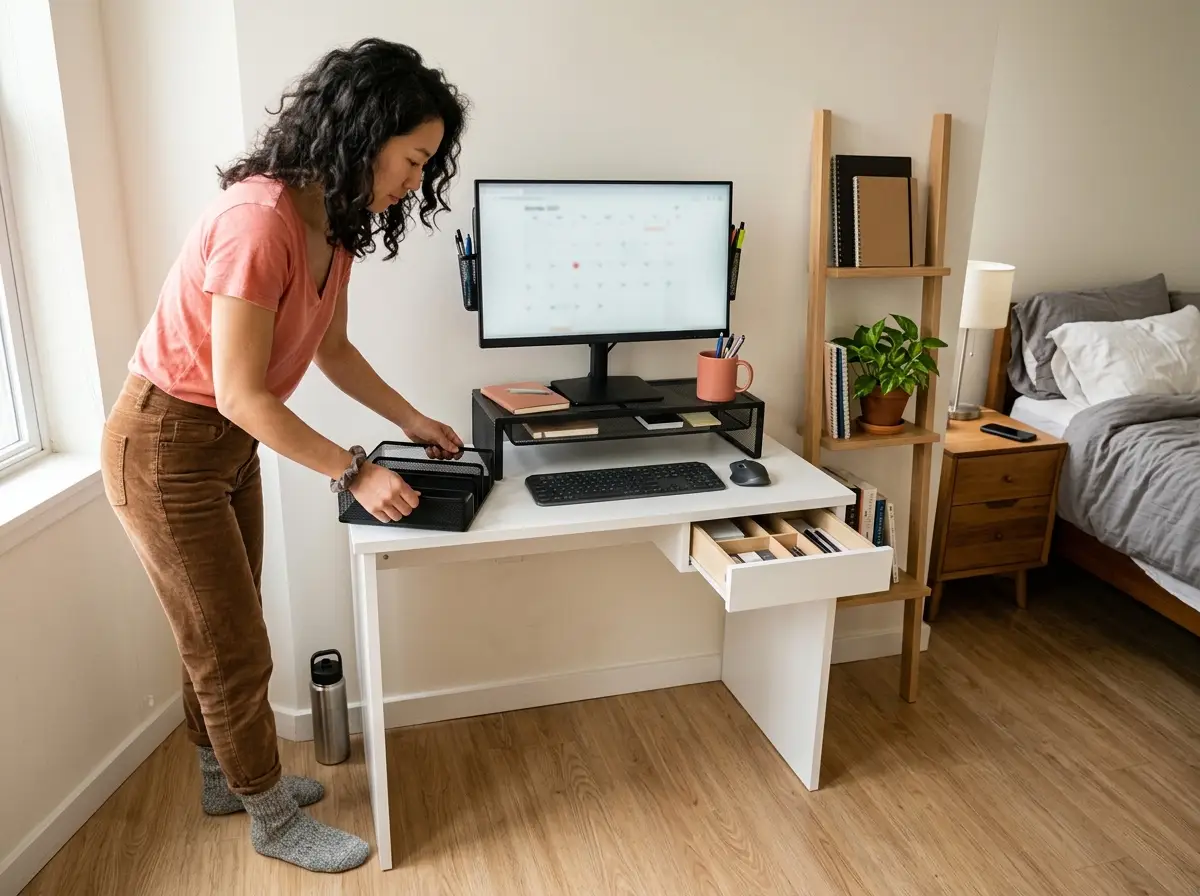
You organized your desk last Sunday: wiped it down, lined up the pens, recycled the mail, felt good about it. By Wednesday it looked exactly the way it did before you started. I’ve set up and reset desks in a lot of apartments, from studios to one-bedrooms to the awkward corner of a shared living room, and this same reversion happens in almost every one. The problem isn’t your discipline or the tray you bought — it’s that a small apartment treats a desk differently than a house does, and once you see the mechanism behind the mess, the fix comes down to five specific moves.
Quick Answer
To keep a small apartment desk organized long-term:
- Build a landing pad near the door so the desk stops collecting everything.
- Edit the desk surface down to five essential items.
- Add a monitor riser to store up, not across the surface.
- Give every drawer category one fixed compartment, kept under 80% full.
- Hide cables with a clamp-mount tray that needs no drilling.
Why Your Small Apartment Desk Gets Messy Again

Here’s the part nobody tells you: your desk doesn’t get messy because you stopped caring. It gets messy because, in a small apartment, the desk is doing a second job it was never meant to do. It’s the catch-all for an entire home that has nowhere else to put things down. Until you fix that, no amount of organizing will hold past the weekend.
The Desk Drift Problem
Desk drift is the slow migration of non-desk things onto your desk — mail, keys, a phone charger, the bag from the corner store, a mug you meant to take to the kitchen. In a house with a dedicated office, drift is slow because the office is out of the way. You walk past a closed door and nothing lands there by accident. In an apartment, the desk usually sits in the bedroom or the main room, a few steps from the front door, and it’s often the only cleared horizontal surface that isn’t a kitchen counter or a coffee table.
So things route themselves there. Not because you’re disorganized, but because the desk is the path of least resistance. You walk in with your hands full, and the nearest flat surface wins.
The first time I really understood this was in a 400-square-foot studio where the desk sat in the bedroom corner. Within a week of move-in, it had become the apartment’s counter: keys, two days of mail, a grocery bag, a charging phone. The tenant apologized for the mess, but there was nothing to apologize for. The desk was the only open surface within reach of the door, so it absorbed everything that came through it.
The Surface Math on a Small Desk
This is the number that changes how you think about a small desk. A laptop-only desk runs roughly 32 to 40 inches wide and 20 to 24 inches deep, which gives you somewhere between 640 and 960 square inches of total surface. That sounds like a lot until you start placing things on it.
A 15-inch laptop takes up about 14 by 10 inches, so call it 140 square inches gone immediately. Add a mouse, a mug, and a notepad and you’ve spent another 200-plus. On the smaller end of the range (a 32-by-20-inch desk), you’re left with under 400 square inches of working space before anything else lands. That’s barely two square feet to actually work in.
Every item sitting on that surface that you’re not using right now is a direct tax on the space you have left.
This is why the five-item rule matters more on a small desk than anywhere else. The surface holds your laptop or monitor, your keyboard or mouse, one pen cup, one notepad, and one lamp. That’s it.
On a desk under 40 inches wide, that isn’t minimalism for the look of it. It’s what the math allows. If a sixth thing wants to live on the surface, a fifth thing has to leave. This is also the foundation for a full desk organization system that holds up over time: the surface limit comes first, and everything else builds on it.
Why No System Survives Without a Landing Pad
The standard advice, when a desk won’t stay clean, is to buy more storage. I gave that advice for years. Then I watched a client’s desk swallow a brand-new six-piece organizer set in about nine days, and I changed my mind. The storage was never the problem. The desk was filling up because it was the apartment’s default drop zone, and adding compartments to a drop zone just gives the clutter nicer places to sit.
The actual fix lives outside the desk. You need a landing pad near the front door (a small table, a wall hook strip with a tray, even a basket on the floor) that catches keys, mail, and the daily pocket dump before any of it reaches the desk. When something competes with the desk for “nearest cleared surface,” the desk stops being the only option. Without that competing surface, even the best desk setup reverts in under two weeks. Build the landing pad first. Then organize the desk.
The Edit — What Actually Belongs on a Small Desk
Most people try to organize a cluttered desk by adding organizers to it. The organizers aren’t the issue. The issue is that too many things are competing for too little surface in the first place. The edit comes before any purchase, and on a small desk it does most of the work.
The Three-Pile Sort
Pull everything off the desk. Yes, everything — drawer included if you’re doing the full job. Organizing things while they’re still sitting on the desk isn’t editing, it’s rearranging, and rearranging is exactly how you ended up with a doom pile in the corner that you keep meaning to deal with.
Once the surface is bare, sort what came off into three piles: daily-use stays on the desk, weekly-or-less goes in a drawer, and doesn’t-belong-here leaves the desk entirely, whether that means another room, the recycling, or a donation bag. Lay the piles out on the floor or the bed where you can see the scale of them. Seeing how much you were about to put back is usually the most honest part of the process. It’s the same method that works on any messy desk, apartment or not; the small-apartment version just has a stricter cutoff for what earns a spot.
The 5-Item Desktop Rule
Five things belong on the surface of a small apartment desk: the laptop or monitor, the keyboard or mouse, one pen cup, one notepad, and one lamp. Everything else gets stored, not displayed. The rule forces a decision every time something new wants out — if a sixth item appears, a fifth has to go away.
The frequency test settles most arguments. If you don’t reach for it at least once a day, it doesn’t earn surface space, and it lives in the drawer or off the desk completely. Professional organizer associations like NAPO make the same point with a tighter version: keep only what you use within arm’s reach (roughly an 18-to-24-inch radius), and treat everything past that as storage.
Stapler you use twice a month? Drawer. Hand cream you use every morning? It can stay, if it’s one of your five.
Defining Your Active Zone
A desk pad gives the five-item rule a visible border. Anything inside the pad is in use and belongs there; anything that drifts outside it is clutter-in-waiting. The pad becomes a daily reset cue — if something is sitting off the pad when you close the laptop for the night, that’s your signal to deal with it before tomorrow.
Before you buy anything, a placemat or a piece of thin cardboard cut to size tests the concept for free. If the border helps, then a real pad is worth it. The Aothia PU Leather Desk Pad runs 31.5 by 15.7 inches, which spans most laptop-only desks, and the PU leather wipes clean instead of soaking up the inevitable coffee ring. Fabric pads look softer but they stain, and in a small apartment where the desk doubles as your dinner table some nights, that matters.
Do the edit at the end of a workday, not the start of one. You’ll be looking at the desk exactly as it gets used, so you make decisions based on what actually piles up — not on the tidy version you imagine you’ll maintain.
Vertical Storage for a Small Apartment Desk
Your desk is covered because the surface is the only usable space you’ve got. There’s no room for another horizontal organizer — adding one just shrinks the working area you were trying to protect. The answer is to go up instead of out, and on a small desk, the monitor riser is the highest-return move you can make.
Why the Monitor Riser Is the First Move
A monitor riser solves two problems with one product. It raises the screen to a natural eye-level position, which your neck will thank you for, and it creates about four inches of clearance underneath that becomes hidden storage. On a small desk, the keyboard slides into that gap during a video call or while you’re reading something on screen, and the primary zone opens up by the keyboard’s whole footprint, roughly 15 by 9 inches you didn’t have a second ago.
I used to recommend a separate monitor stand plus a separate pen organizer for small desks. After setting up a dozen apartment workspaces, I switched to risers with built-in pockets, because one product replaces two and a small desk can’t afford to host both. The WALI STT005-B Monitor Riser is a single mesh unit with a drawer and side pockets, which means it fits desks under 36 inches without crowding the surface, and the side pockets hold pens and a phone so you skip the standalone cup entirely. It sits on the desk with no drilling and no adhesive, so it’s renter-safe by default.
Before you buy, test the height for free. Stack a few thick cookbooks or hardcovers under the monitor and live with the raised height for a day or two. I do this every time — it tells you whether the higher screen position actually helps your neck before you commit to a product, and occasionally it tells you the desk is too shallow and you need a monitor arm instead.
On a desk under 32 inches wide, keep any stacked desktop organizer under 8 to 9 inches across. Anything wider eats into the primary zone faster than it clears it, and you’ll quietly stop using it within a month.
What to Do When You Have No Wall Space
Almost every “small desk” article defaults to the same move: add floating shelves above the desk. If you can’t drill — because you rent, because the wall is concrete, because your lease is specific about holes — that advice is useless to you. There are two renter alternatives that get you the same vertical storage without touching the wall.
The first is a freestanding desk hutch, a small shelf tower that sits on or behind the desk and reaches overhead without ever contacting the wall. The second is a narrow freestanding bookshelf placed directly behind the desk, which gives you the same visual effect as mounted shelves and moves with you on moving day. For the full menu of options here, including what works on hollow-core doors and tight corners, the renter-friendly vertical storage options guide goes deeper. And if you want help picking the compact organizers that actually fit a small surface, the best desk organizers for a small desk breaks down which ones earn their footprint.
One caution worth repeating: even Command strips fail on textured or flat-matte paint, which is the most common finish in apartments. Test a single strip in a hidden spot before you trust it with anything heavier than a cable.
Surface and Drawer Organization
You’ve done the edit and added vertical storage. Now the two systems that have to actually hold day to day: a visible boundary on the surface so drift gets caught early, and a drawer with fixed categories so it doesn’t quietly turn into a second junk drawer by the end of the month.
The Desk Pad Zone Rule
The desk pad isn’t decoration. It’s a cue system. Everything inside the pad is active; everything outside it is drift you address before the day ends. On a laptop desk, a 31-to-32-inch pad covers the working width without hanging off the edges, and at night it gives you a one-glance check: anything sitting off the pad gets put away before you close up.
Material matters more in an apartment than people expect. PU leather wipes clean, so the coffee ring from your 7 a.m. meeting comes off with a paper towel. A fabric pad absorbs the same spill and keeps it forever. If you’re testing the idea first, a placemat does the job for nothing — buy the real one only once you know the border helps you.
Fixing the Drawer Before It Fixes You
The drawer usually fails for one reason: an organizer got added before any categories got assigned. So everything goes in, nothing has a single fixed spot, and within three weeks you’ve got the everything drawer — a second junk drawer wearing a mesh tray. The conventional wisdom says “add drawer dividers.” Dividers alone don’t fix anything. Rules do.
Empty the drawer completely and sort what’s inside by how often you reach for it. Then assign one compartment per category (batteries here, tape here, spare pens here, charging cables here, sticky notes here, scissors here) and ban the “miscellaneous” section entirely, because a miscellaneous compartment will eat the whole drawer the same way the everything drawer did.
Then apply the 80% rule: leave a fifth of the drawer empty. The test is simple. If the drawer won’t close with one finger, take something out until it does, because a drawer that needs two hands to shut is a drawer people stop shutting, and an open drawer collects surface overflow.
Before buying anything, rubber-banded small boxes or even an egg carton make free dividers while you confirm your categories. Once they’re settled, an expandable organizer beats a fixed tray because apartment furniture drawers vary so much in width. The Marbrasse Expandable Drawer Organizer adjusts from 13.8 to 17.5 inches, which covers most standard single drawers (usually 14 to 18 inches wide), and its ten compartments give you enough fixed homes to enforce one category each without buying extra inserts. Frequency-wise, daily items go in front and the rarely-touched stuff goes to the back corners — the same logic that frequency zoning applies across the entire desk system.
The one-finger-close test is the single best maintenance habit for a small desk drawer. Check it once a week. The day it fails the test is the day the drawer started becoming a junk drawer again — catch it then, not three weeks later.
The Compact Desktop Organizer Problem
Multi-piece desk organizer sets (the five- and eight-piece ones with the matching trays and file racks) are built for big executive desks. Drop one on a 32-to-36-inch surface and it swallows the working area whole. The right pick for a small desk is one compact unit that holds pens plus a few small supplies, ideally no more than 8 to 9 inches wide.
There’s a free version, and it works: a single tall mug holds pens and pencils, and a small tin holds the loose supplies. The upgrade only earns its spot if the mug keeps tipping or you’ve outgrown the slots. When that happens, the Marbrasse Mesh Pen Organizer is one of the most compact multi-slot options out there at 7.5 by 5.5 inches, and its two small drawers hide the erasers, clips, and USB drives that otherwise scatter across the surface. Run the small-desk test before you keep it: set it down, and if you’ve got less than a foot of clear working space left, it’s too big for your desk.
Renter-Friendly Cable Management
Maybe you’ve tried cable clips that pulled the paint when you peeled them off. Maybe you tried velcro ties and the cables still ended up draped across the back. Or maybe you never tried anything because you didn’t know there were no-drill options that don’t risk your deposit. Cable spaghetti under a small desk is one of the most-fixed and least-explained problems in apartment organizing, so here’s the complete renter version.
Why Apartment Cable Management Usually Fails
The standard advice is to route cables along the wall with Command strips. And it works — unless your apartment has textured or flat-matte paint, which most do. On those finishes the adhesive cures poorly, and a few weeks of temperature swings near a window is enough to release it. When it lets go, it often takes a chip of paint with it, which is the opposite of deposit-safe.
Screw-in under-desk cable hooks are the other common suggestion. Fine if you own the desk. A risk if you rent it, because you’re putting permanent holes in furniture that may not be yours. And velcro ties on their own don’t route anything — they bundle cables together, but the bundle still has to go somewhere, and “somewhere” is usually back on the surface or dangling off the edge.
The Clamp-Mount Solution
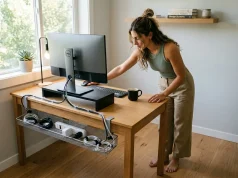
A clamp-mount under-desk cable tray is the one renter solution that actually removes cables from sight without any wall contact at all. It grips the desk edge with a screw clamp — no tools, no adhesive, no holes — and holds your power strip plus all the cable slack underneath, out of view. On move-out, it comes off in under a minute and leaves nothing behind but maybe a faint impression on soft particle board.
The Cinati 16″ Cable Management Tray comes as a two-pack and its clamp fits desks from 0.4 to 3 inches thick, which covers basically every apartment desk material. One 16-inch tray holds a power strip and the slack for a standard four-cable setup; the second one lets you run cables off both edges if your layout needs it. Budget version first, though: a large binder clip on the back edge of the desk, with cables looped through the arm, keeps them off the surface for free — I’ve used that on a temporary setup and it held fine for months. The full menu of approaches, including sleeves and channels, lives in the full breakdown of cable management systems for desks, and since cables are only one piece of a rental, it’s worth thinking about apartment organization as a whole while you’re at it.
The Three-Step No-Drill Cord Routine
Most apartment desks don’t have the ten-cable nightmare people picture. They have four: power, monitor, keyboard or mouse, and a phone charger. Tame those four with one sequence and you’re done.
- Bundle at the source. Velcro-tie the cables together where they meet the power strip, so four cords read as one.
- Clamp the tray under the desk. The power strip lives inside it, and only one cord runs up to the surface.
- Clip the last foot. A single Command Cord Clip on the back edge holds that one surface cord in place so nothing flops around.
Total cable visible on the desk: one. The whole thing takes about 20 minutes the first time, and the clamp tray made the difference in a rental I set up where the tenant was certain she’d lose her deposit to cord damage — it all came off clean when she moved.
Conclusion
The reason your desk keeps reverting isn’t a flaw in you. It’s that the desk is the apartment’s default landing pad, and you have to fix that routing problem before any organizer can hold. Build the competing landing pad near the door first. Then defend the surface with the five-item rule and the desk pad zone, because everything above that limit is just competing for the working space you barely have. And for cables, the clamp-mount tray is the only renter-safe option that genuinely gets them off the surface without risking a single dollar of your deposit.
Three-Month Check: in three months, pull the drawer organizer out and look for any compartment that’s quietly become a “miscellaneous” zone. That’s the first sign the drawer is sliding back toward junk-drawer territory, and it’s a five-minute fix if you catch it early.
Start with the landing pad. Put a tray or a basket near your front door before you buy a single desk organizer. If the desk clears on its own within a week, you’ve found the real cause. Then go tackle the surface.
Frequently Asked Questions
01How do you organize a small desk in an apartment?
Clear everything off first, then apply the five-item rule: laptop, keyboard, one pen cup, one notepad, one lamp. Add a monitor riser for vertical storage, a drawer organizer for anything used weekly or less, and a clamp-mount cable tray to remove cord mess without drilling.
02What should I keep on my desk versus put away?
Keep only what you reach for daily. If you haven’t touched it today, it belongs in a drawer or off the desk. Use the desk pad test: restrict everything to the pad, and anything sitting outside it when you sit down counts as clutter.
03How do I organize a desk with no drawers?
A monitor riser with built-in side pockets handles pens and small supplies. A rolling cart beside the desk replaces drawer storage for notebooks and files, and a compact desktop organizer with hidden drawers gives you some concealed storage even without a built-in desk drawer.
04What desk organizers work best for small apartment desks?
Single-unit products that do more than one job, like a monitor riser with built-in pockets instead of a separate stand plus a pen cup. On desks under 36 inches wide, skip multi-piece organizer sets — they take up the surface faster than they clear it.
05How do I manage cables on a small desk without drilling?
Use a clamp-mount cable tray that grips the desk edge with no screws or adhesive and removes cleanly when you move. Bundle cables with velcro ties at the power strip, run the bundle through the tray, and use one cord clip on the back edge to hold the single surface cord in place.